Control
every degree
of your VRAM
VRAM Shield manages heavy compute processes to keep your memory within safe operating temperatures. Take control of your hardware's thermal limits.
Core Features
Professional-grade thermal management tools for your RTX laptop.

Real-time Vision
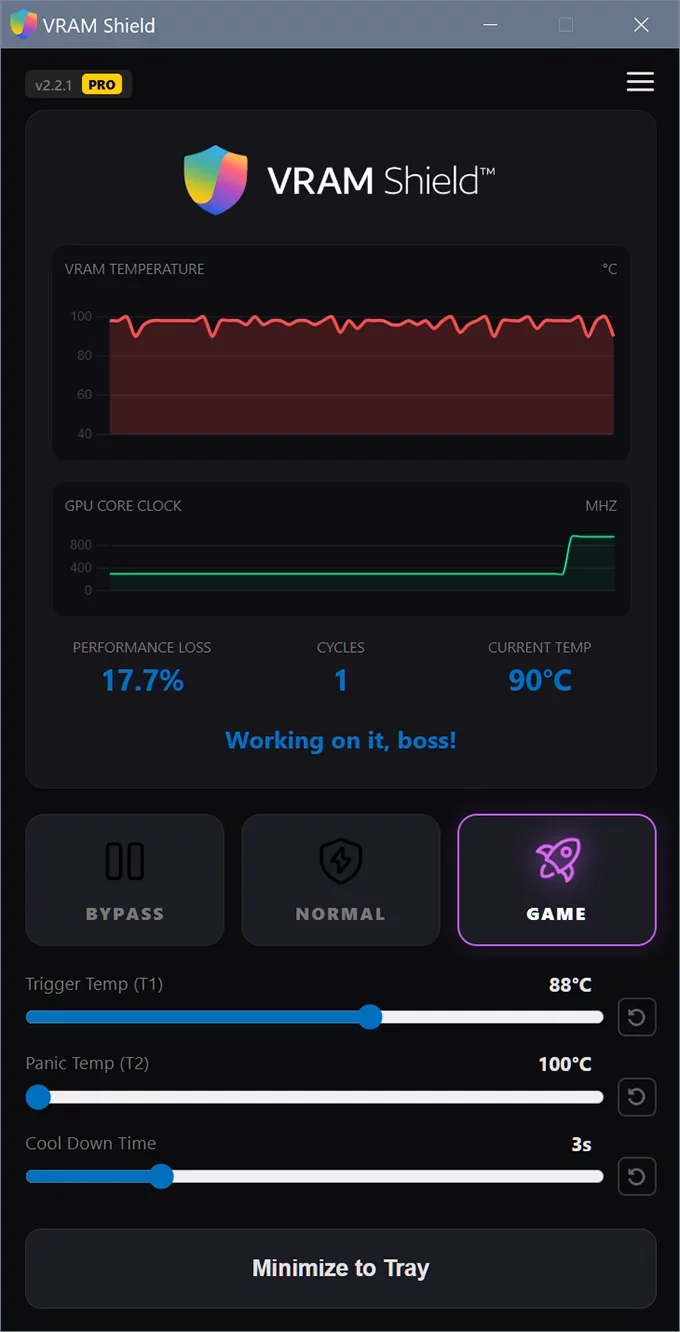
High-precision monitoring of VRAM temperature and core clocks. Millisecond-accurate graphs.

Pulse Throttling
Unique process cycle pause algorithm for effective cooling without performance drops.

Panic Trigger
Automatically halts compute-heavy processes upon reaching thermal limits.

Smart Control
Advanced mathematical logic that micro-adjusts load to maintain target temperature invisibly.

Stealth Mode
Ultra-low resource consumption. Operates silently in the tray with zero impact on system speed.

Fine tune
Flexible settings allow you to customize thresholds and cooldown times to match your specific hardware needs.
Two Thermal Management Algorithms
VRAM Shield offers two throttling methods for sustained AI workloads.
Pulse Throttling
The "Static Scheduler". Effective thermal capping, but noticeable in heavy games due to fixed cycles.
- ✕ Noticeable micro-stutters
- ✓ Guaranteed temp drop
Smart Throttling
The "Dynamic Scheduler". Uses advanced mathematical logic to micro-adjust load. Maintains rendering stability and fluidity.
- ✓ Smooth, fluid gameplay
- ✓ Adaptive real-time response
What they say

Alex R.
AI Researcher
"VRAM Shield kept my render stable during a 48h session. Thermal throttling completely disappeared."

Chen W.
Gamer
"Finally, a tool that respects my hardware. No more thermal throttling."

Sarah J.
3D Artist
"Essential for any RTX laptop owner. The technology is genius."

James T.
DevOps
"Minimalist UI and millisecond-accurate monitoring. 5/5 stars."

Maria G.
ML Specialist
"Reduced my VRAM fan noise significantly while keeping temps safe."

Kenji S.
Miner
"Stable and reliable. Using it on all my portable rigs."
Common Questions
Everything you need to know about VRAM Shield and your hardware safety.
Does this modify firmware?
No. VRAM Shield uses standard OS signals (suspend/resume) to pause heavy AI processes, allowing natural heat dissipation.
Will I get banned in online games?
No. Unlike many system utilities, VRAM Shield does not inject any code into game memory or modify game files. It operates at the process management level, which is completely transparent to anti-cheat systems like Easy Anti-Cheat or BattlEye.
Is the free version effective?
Yes. The free version includes our standard Pulse Throttling scheduler. It acts as a hard thermal limiter to keep VRAM within your target range. It is the right choice if you prioritize strict temperature control over rendering fluidity.
Why is the performance loss sometimes high?
VRAM Shield acts as a diagnostic mirror for your hardware. If you see high performance loss (40%+) even in Game Mode with default settings, it often indicates that your laptop's physical cooling cannot keep up with the heat generation (e.g., dried thermal paste or dust). The software is forced to apply aggressive braking to prevent critical overheating.
Does this replace my cooling system?
Absolutely not. VRAM Shield is a software safeguard, not a substitute for physical cooling. It acts as a final line of defense when your fans are overwhelmed. While it prevents burnout by managing heat spikes, maintaining your hardware remains essential for peak performance.
Why is the PRO version better than the Free one?
While both versions protect your hardware, the PRO version unlocks the premium Game Mode. It uses Smart Throttling — a sophisticated mathematical logic that micro-adjusts the load hundreds of times per second. This results in a much smoother experience with minimal performance loss (under 10%), making the protection almost invisible during gameplay.
Choose Your Edition
Lifetime license. No subscriptions.
VRAM Shield Free
- ✓ Pulse Throttling (Standard scheduling)
- ✓ All Monitoring Features
- ✓ Trigger temp settings
- ✓ Autostart with system
- ✓ Desktop Notifications
VRAM Shield PRO
- ✓ All Free features and...
- ✓ Smart Throttling (Advanced scheduling)
- ✓ Panic Trigger Settings
- ✓ Cool down Settings
- ✓ Free updates included (v2.x)